Two Addresses
Your CRM has two address fields. The mailing address is where the Christmas card goes. The home address is where the house is. Every tool from here on starts from the house.
VIDEO LOADING
This episode's video is being uploaded. The walkthrough below is ready now.
Listen, read by an AI voice 2:30
Put the House in Home
The rule is one line: the house goes in Home. The PO box goes in Other. Work goes in Work.
A PO box is not a house. Nothing can look up a PO box and tell you what it is worth, when it last sold, or whether the owner is about to move. If the only address on a client is the one you mail things to, then as far as any software is concerned, that client does not own a home. Who is likely to sell, what their house would go for today, who to call before the listing exists: all of it starts by looking up a house. No house, no answer.
The 45-Second Fix, on Screen
- Open the contact. Click Edit on the far right, then Contact Info.
- Scroll to Postal Addresses. Everything you ever entered, and everything Cloze added on its own over the years, is listed here.
- Old address? Archive it, never delete it. Click the minus, choose Archive. Deleted addresses come back the next time Cloze syncs. Archived ones stay gone.
- The house they live in: click the icon next to it, choose Home, and mark it the preferred personal address.
- The PO box: click the building icon and choose Other. Cloze files it as Other, and the Home Platform reads Other as the mailing address.
- Their office: leave it on Work.
- Save.
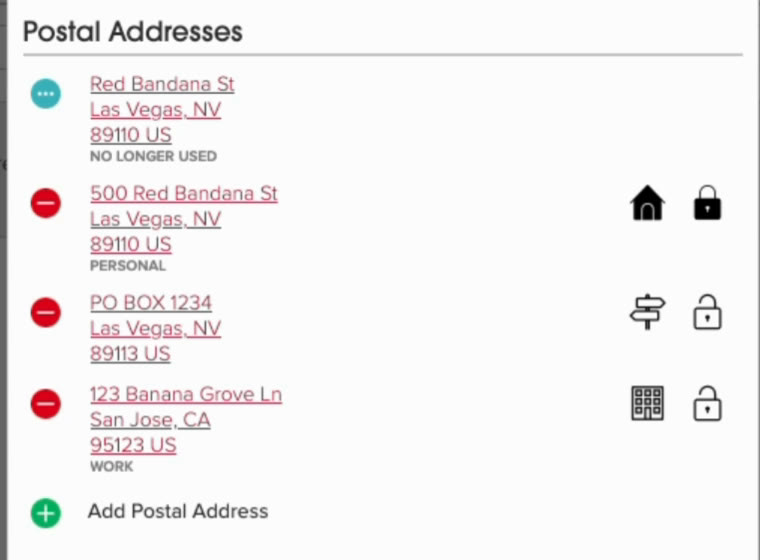
This is what done looks like. House icon on the house, signpost on the box, building on the office:
Where to Start
You are not being asked to go find addresses. That episode has aired three times, and Forewarn and TruePeopleSearch are still on this site if you need them. You are being asked to check which slot the addresses you already have are sitting in.
Start with your closings. Export your sold side out of the MLS, as far back as it goes. Every row on that export already has the house on it. You handed them the keys. You just never told the CRM which slot.
It does not matter if they live in your market. The college roommate in Florida gets the Florida house. When that house is about to sell, you want to be the one who knows. That is a referral.
Your assignment this week: open your closed clients, one at a time, and put the house in Home.
Transcript of the training video
Here's how we're going to update our clients who need a mailing address and a home address. We're going to open them up. We're going to click on Edit on the far right hand side. And we're going to click Contact Info. From here, you're going to see all of the postal addresses that you have or that Cloze has put in over the years.
Now from here, you can change all of these. If one of these is old, for example this Red Bandana Street, you can hit the minus button and click Archive. Gone. As a reminder, I do not recommend deleting addresses because Cloze will just re-add them. Instead I recommend archiving.
Now we have this home address and we have two business addresses. So here's how I would handle this particular client. This is the house he actually lives in, so I would click the home button and I would click preferred personal home. Now here we have the P.O. box. This isn't his business address, but this is his mailing address. So again I'm going to click on the building and I'm going to choose other. Now, Cloze will mark that as other, and the Home Platform will pull that in as the mailing address.
The last one is his business address, already set as business. So I'm just going to make sure that it is, and click work. Perfect. Done. Took all of what? 45 seconds? And that's all you're going to have to do. All right? If you have any questions, let us know. Thanks so much. See you later.